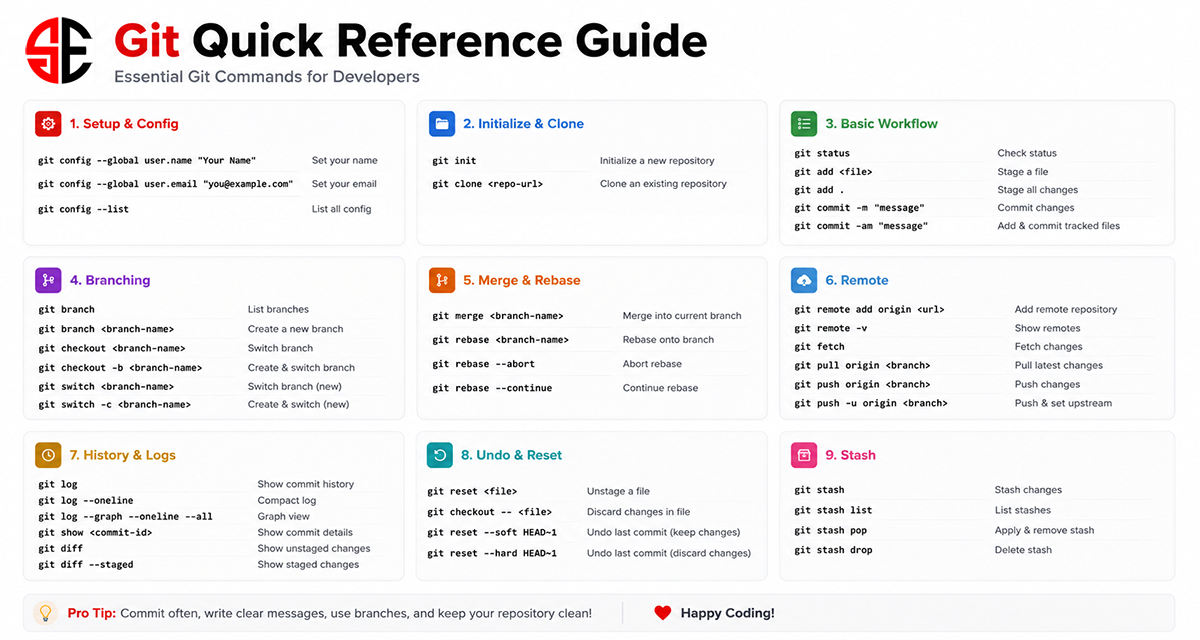
Git is one of the most important tools for modern software development. It helps developers track code changes, work in teams, manage versions, and safely maintain project history. Whether you are working on a small project or a large production application, Git makes development more organized and reliable.
It is useful for beginners, Laravel developers, DevOps engineers, students, and anyone working with code repositories.
1. Configure Git
Before using Git, set your name and email address. This information is attached to your commits.
git config --global user.name "Your Name"
git config --global user.email "your-email@example.com"
To check your Git configuration:
git config --list2. Initialize a Git Repository
To start tracking a project with Git, go inside your project folder and run:
git initThis creates a new Git repository in your current directory.
3. Clone an Existing Repository
If you want to copy an existing repository from GitHub or another Git server, use:
git clone https://github.com/username/repository.git4. Check File Status
To see which files are changed, staged, or untracked, use:
git status5. Stage Changes
To stage a specific file:
git add filename.phpTo stage all changed files:
git add .6. Commit Changes
After staging changes, save them into Git history with a message:
git commit -m "Added login functionality"7. View Changes
To see unstaged changes:
git diffTo see staged changes:
git diff --staged8. Branch Management
Branches help developers work on new features without affecting the main code.
List all branches:
git branchCreate a new branch:
git branch feature-loginCreate and switch to a new branch:
git checkout -b feature-loginSwitch to another branch:
git checkout main9. Merge Branches
To merge another branch into your current branch:
git merge feature-login10. View Commit History
To view commit history:
git logFor a short and clean history:
git log --oneline11. Add Remote Repository
To connect your local repository with GitHub:
git remote add origin https://github.com/username/repository.gitTo check connected remotes:
git remote -v12. Push Code
To push your code to a remote repository:
git push origin mainFor the first push, you can use:
git push -u origin main13. Pull Latest Code
To get the latest code from the remote repository:
git pull origin main14. Fetch Updates
Fetch downloads remote changes without merging them automatically:
git fetch15. Undo Changes
Unstage a file while keeping local changes:
git reset filename.phpUndo the last commit but keep the changes:
git reset --soft HEAD~1Remove the last commit and changes permanently:
git reset --hard HEAD~116. Stash Temporary Changes
Stash is useful when you want to save your current changes temporarily and switch to another task.
Save changes:
git stashList saved stashes:
git stash listRestore latest stash:
git stash pop17. Remove or Rename Files
Remove a file from Git and your project:
git rm filename.phpRename or move a file:
git mv old-name.php new-name.php18. Ignore Files
Some files should not be committed, such as environment files, logs, vendor folders, and node modules. You can add them to a .gitignore file.
/vendor/
/node_modules/
/.env
*.log
Most Useful Daily Git Commands
git status
git add .
git commit -m "Your message"
git pull origin main
git push origin main
git checkout -b feature-name
git merge feature-name
git log --oneline
git stash
git stash pop
Conclusion
Git is not just a version control tool; it is a daily development companion. By learning these essential commands, developers can work more confidently, manage code safely, collaborate with teams, and maintain a clean project history.
For beginners, the best way to learn Git is by using it daily. Start with simple commands like git status, git add, git commit, git pull, and git push. Once you are comfortable, move to branching, merging, reset, and stash commands.